
8 Hidden Risks of AI in Smartphones (And How to Stay Safe)
AI-powered phones now help with writing, search, camera features, summaries, translations, and security, but they also increase exposure to privacy problems, manipulation, and new attack methods. Security and mobile-risk reports in 2026 repeatedly warn that AI systems can introduce data leakage, adversarial attacks, phishing at scale, bias, hallucinations, API abuse, and governance problems if they are not handled carefully.
The hidden part is that many of these risks do not appear to be “hacking” at first. They often appear as convenient apps, smart assistants, camera tools, or harmless prompts, even though those tools may access sensitive data, send it to third parties, or make confident mistakes that users trust too easily.
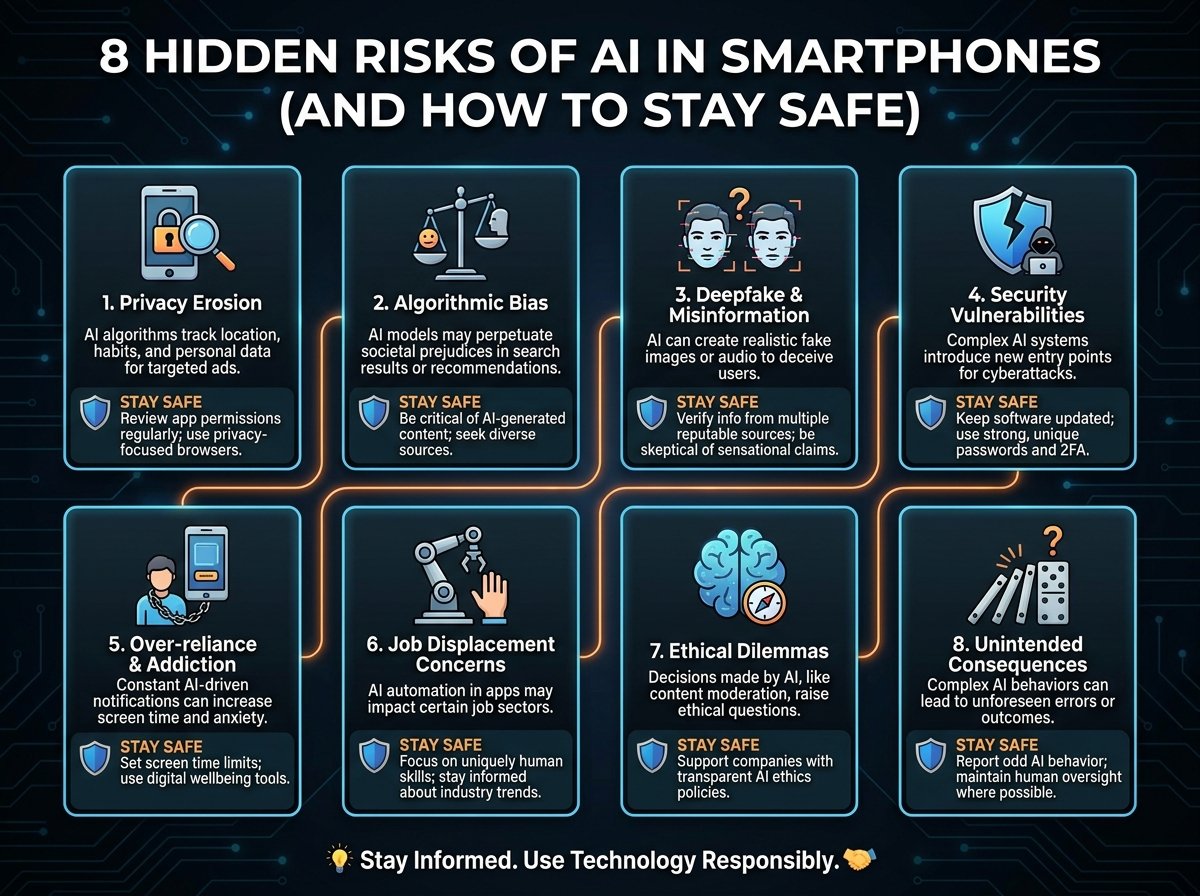
8 hidden risks
-
1. Private data leakage. AI phone features and apps often access emails, documents, contacts, photos, location data, and customer information, and some mobile AI systems can share that data with third-party services or store it in unsafe environments if oversight is weak. To stay safe, review permissions regularly, avoid uploading sensitive documents unless necessary, and favor apps that clearly explain where data is processed and stored.
-
2. AI-powered phishing and social engineering. Samsung’s 2026 security report says generative AI lets criminals produce large numbers of convincing phishing messages, fake voices, and even deepfakes across email, SMS, voice calls, and QR-based attacks. To stay safe, verify urgent messages through a second channel, do not trust the caller’s voice alone, and treat QR codes, SMS links, and “account warning” prompts with extra suspicion.
-
3. Hallucinations that lead to bad decisions. A10 Networks lists hallucination risk as a major operational threat, and broader AI risk reporting notes that false but confident outputs can distort decisions when users assume the assistant is correct. To stay safe, double-check important answers involving money, health, travel, contracts, or identity, and use cited sources instead of relying on one AI response.
-
4. Prompt injection and manipulated AI behavior. A10 says prompt injection is one of the most significant generative AI threats because attackers can hide malicious instructions in text and manipulate how the model behaves. To stay safe, be careful with copied prompts, strange documents, pasted website text, and AI tools that ask for broad permissions or hidden context access.
-
5. Bias and unfair outputs. Group-IB and IBM both identify bias as a core AI risk, which matters on smartphones because AI is increasingly used for prioritization, recommendations, search, moderation, and assistive decisions. To stay safe, treat AI suggestions as advisory rather than neutral truth, especially when they affect people, identity, language, or financial choices.
-
6. Adversarial and poisoning attacks. SentinelOne highlights data poisoning, while Group-IB points to adversarial attacks that can distort how AI behaves or classifies information. To stay safe, keep your phone and apps updated, avoid unofficial AI apps or modified APKs, and be cautious with tools that rely on unknown models or unverified sources.
-
7. Hidden compliance and jurisdiction problems. NowSecure warns that mobile apps may send AI data to endpoints in different jurisdictions, which can create data residency and compliance issues even when the feature seems simple. To stay safe, check privacy policies for where data is processed, avoid using casual AI apps for business-sensitive material, and separate personal use from client or company data when possible.
-
8. Overtrust in “smart” protection. Android says AI-powered protections can detect scams, phishing, and malware, which is helpful, but no mobile defense catches everything, and false positives or blind spots still exist. To stay safe, use built-in protections, but combine them with strong passwords, biometric locks, app reviews, and manual skepticism instead of assuming the phone will always catch the threat for you.
How to stay safe
The most practical defense is reducing exposure before anything goes wrong. Security guidance across mobile and AI-risk sources points to a simple pattern: limit app permissions, keep operating systems and apps updated, secure API keys and sensitive transmissions, remove suspicious or unused apps, and review what data your AI tools can access.
It also helps to separate convenience from sensitivity. For high-risk tasks such as banking, confidential business communication, identity documents, or legal material, use fewer AI tools, save less data on the phone, and consider a separate device strategy if your work is especially sensitive.
Practical checklist
-
Lock your phone with a strong PIN, fingerprint, or Face ID.
-
Turn on automatic OS and app updates.
-
Revoke unnecessary access to camera, mic, contacts, location, and files.
-
Do not paste passwords, banking details, contracts, or client secrets into casual AI apps.
-
Prefer AI tools with clear privacy controls and transparent data handling.
-
Be suspicious of urgent messages, cloned voices, and deepfake-style video or audio.
-
Run security scans and remove unknown apps if your phone starts acting strangely.
-
Change key passwords from a trusted device if you suspect compromise.
FAQ
Are AI smartphones unsafe by default? No, but they carry additional risks because AI features often process more personal data and create new attack surfaces around prompts, models, APIs, and automation. The risk is manageable when permissions, updates, and verification habits are strong.
What is the biggest AI risk on a phone right now? For most users, the most immediate risk is AI-enhanced phishing and social engineering, because it scales well and can arrive through text, voice, email, and QR codes. Privacy leakage is a close second because many AI apps request broad access to sensitive content.
Can built-in AI security features fully protect me? No. Android says AI can help detect scams, malware, and phishing, but broader security reporting also warns about false positives, adversarial attacks, and gaps in automated detection.
Should I stop using AI features on my phone? Not necessarily. A better approach is to use AI for low-risk convenience tasks and avoid using it casually for sensitive personal, financial, or business information unless you understand exactly how that data is handled.
How do I know if an AI app is too risky? Be cautious if it asks for broad permissions, has unclear privacy terms, hides where data is processed, or pushes you to upload large amounts of personal information. Those are common signals that the convenience may outweigh the privacy benefit.
AI in smartphones is most dangerous when it feels invisible, trustworthy, and automatic at the same time. The safest users in 2026 will be the ones who enjoy AI convenience while still checking sources, limiting permissions, and assuming that “smart” does not always mean “safe.”
