
Phone Compare is a free tool that lets you choose up to three phones and see their specifications side by side. Focus on one category, or switch on Show differences only to see just what sets the phones apart.
How to use Phone Compare
No account and no download. Phone Compare works in three steps.
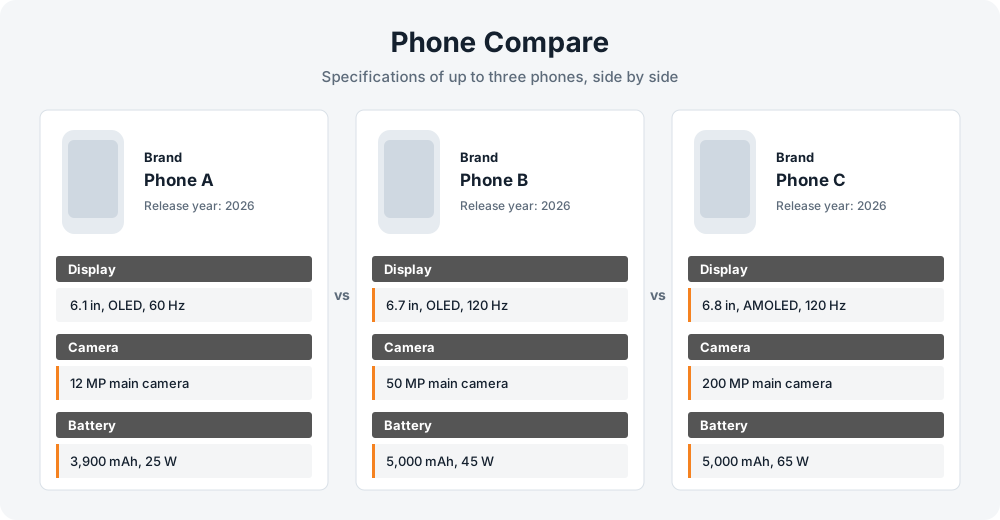
- Add your phones. Start typing a phone name (three letters is enough) and choose the model from the list. Repeat in the other boxes to compare two or three phones.
- Pick the topics you care about. Leave All categories on for the full sheet, or select only the areas that matter to you, such as Camera and Battery.
- Press Compare and read across. Each phone gets its own card with the same sections in the same order. Switch on Show differences only to hide every spec the phones share.
How to read Phone Compare results
Each section of a Phone Compare result answers a different question. Focus on the ones that match how you use your phone.
- Display
- Screen size and resolution tell you how much fits on screen and how sharp it looks. The panel type (OLED, AMOLED, LCD) affects contrast and black levels, and a higher refresh rate such as 120 Hz makes scrolling feel smoother. Peak brightness matters if you often use the phone outdoors.
- Camera
- Do not stop at the megapixel count. Compare the number of rear lenses, whether there is a telephoto or ultrawide, the aperture and the presence of optical image stabilization. Video modes (for example 4K at 60 fps) are listed separately and often differ between phones with similar photo specs.
- Battery
- Capacity in mAh is a starting point, not a verdict. Real battery life also depends on the chipset, the screen and the software. Charging speed in watts shows how fast the phone refills, so look at both numbers together.
- Performance
- The chipset and CPU decide how well the phone handles games, camera processing and many apps at once. Compare chips from the same generation and price tier, because a newer mid-range chip can beat an older flagship in some tasks.
- Memory
- RAM helps with multitasking, while storage decides how many apps, photos and videos you can keep. Check whether there is a memory card slot, since many current phones do not have one and cannot be expanded later.
- Connectivity
- Look at 5G support, the Wi-Fi version, Bluetooth, NFC and the type of USB port. Network bands matter most when you buy a phone made for another region, so check them against what your carrier uses.
- Design
- Size, weight and build materials show how the phone feels in the hand. The water and dust resistance rating (for example IP68) tells you how well it copes with splashes and dust, and it is easy to overlook on a spec sheet.
Tips for choosing between phones
Compare phones in the same class
A flagship and an entry-level model will always look very different on paper. Comparing phones at a similar price tells you far more.
Look for what the spec sheet does not say
A list of specifications cannot show software quality, camera processing or how long the manufacturer promises updates. Read reviews and the manufacturer announcement before you decide.
Use the differences switch to decide
When two phones are close, hide the shared specs. The few rows that remain are usually the real reason to pick one over the other.
About the Phone Compare data
The specifications shown by Phone Compare come from the MobileAPI.dev device database. Manufacturers sometimes change details between regions and versions, so treat the results as a guide and confirm anything important, such as network bands or the exact storage option, on the manufacturer's official page.
Spotted a mistake or a missing phone? Tell us through the contact page. This page was last updated on October 6, 2026.
Frequently asked questions
What is Phone Compare?
Phone Compare is a free online tool that shows the specifications of up to three phones side by side, so you can see which one fits you best.
How many phones can I compare at once?
Up to three. Add at least two phones to enable the Compare button.
Why is a spec missing or shown as a dash?
The database does not have a value for every phone. A dash means the information was not available for that model.
Why can I not find my phone?
Try a shorter search, for example the brand and model number only. Very new or rare models may not be in the database yet.
Are the specifications always correct?
They come from a third-party database and can contain gaps or small errors, especially for regional variants. Check important details such as network bands with the manufacturer.
Can I share a comparison?
Yes. After you press Compare, the address in your browser contains the phones you chose. Copy it and send it to anyone.
Does Phone Compare work on mobile?
Yes. On small screens the phone cards line up in a row that you can swipe sideways.
Related guides
Read more before you choose your next phone.